

Best overall for evidence-backed budget reallocation: Paid Lens. Best for Google Ads campaign diagnostics: Google Ads. Best for website behavior: Google Analytics. Best for CRM context: HubSpot. Best for Meta campaign diagnostics: Meta Ads Manager. This 2026 guide compares ad performance analytics tools by the decision each one helps you make, not by how many charts it displays.
- Paid Lens is the best ad performance analytics tool here for agencies defending cross-channel budget reallocation decisions.
- Google Ads and Meta Ads Manager are the direct choices for diagnosing campaigns on their respective platforms.
- Google Analytics adds website behavior; HubSpot adds CRM context where your team records it.
- Check each required connection and its current availability before choosing a cross-channel workflow.
Why this matters
A campaign report answers what happened inside an ad account. A budget decision asks a harder question: which spend should change, what business outcome supports that change, and how confident should you be? Those are different jobs.
For an agency, the distinction becomes visible when a client asks why spend moved between Google Ads and Meta. Clicks and platform-reported conversions are part of the answer. CRM pipeline and revenue can change it. The right tool depends on whether you need to inspect a campaign, understand what visitors did after the click, or defend a recommendation across data sources.
In 2026, do not pick one dashboard to do every job. Choose the system that owns the decision you need to make, then check the gaps between ad, analytics, and CRM data before acting.
What makes the best ad performance analytics tool?
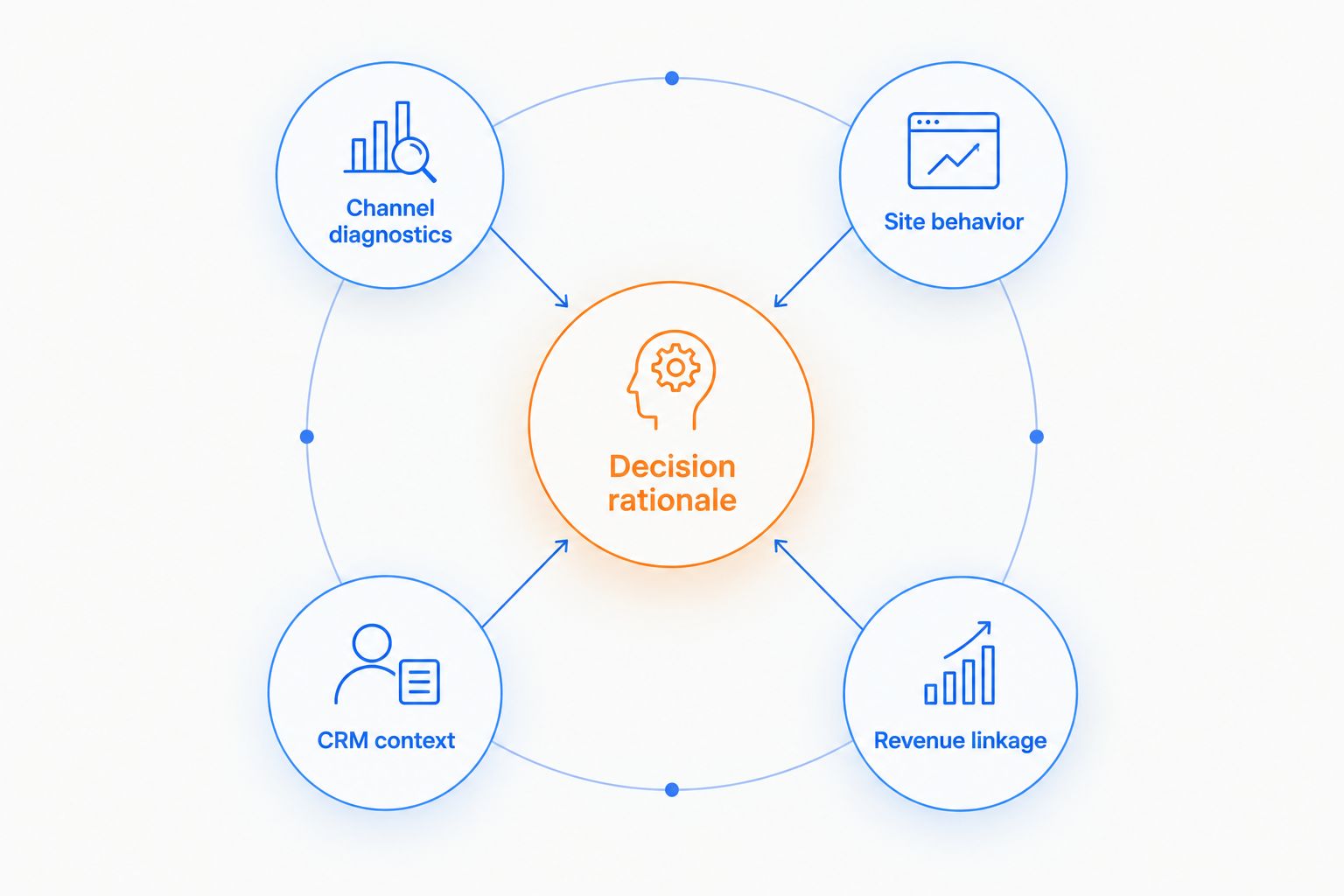
Use these criteria before reading the ranking. A tool wins only when its strength matches the decision on your desk.
- Channel diagnostics: Can you find the campaign, ad, or audience behind a change in that platform's reported results?
- Site behavior: Can you see what happens after a visitor reaches your website, rather than stopping at the ad click?
- CRM context: Can you relate marketing activity to the lead and opportunity records your team uses to discuss pipeline?
- Revenue linkage: Can the decision be examined against business outcomes, not just an ad platform's conversion count?
- Decision rationale: Can a marketing lead explain why a proposed change deserves attention, what evidence supports it, and where confidence ends?
These are not interchangeable scores. Google Ads is a direct place to investigate Google Ads campaigns; that does not make it your CRM record. A CRM record adds business context; it does not replace an ad account's campaign detail. Start with the unanswered question, then select the reporting layer.
The distinction is clearest when the layers disagree. A channel can show strong platform results while the associated CRM records give a different picture of pipeline. Investigate the discrepancy before you move spend. Treat attribution settings, missing records, and timing differences as questions to resolve, not as proof that one report is automatically right.
The best ad performance analytics tools at a glance
| Tool | Best for | Standout role | Key limitation |
|---|---|---|---|
| Paid Lens | Cross-channel budget reallocation | Ranked recommendations with evidence, expected impact, and confidence | Depends on the availability and quality of connected ad and business data |
| Google Ads | Google Ads campaign diagnostics | Direct access to campaign reporting in Google Ads | Does not, by itself, establish CRM revenue across channels |
| Google Analytics | Website behavior after acquisition | Examines on-site activity across traffic sources | Site activity alone does not settle every pipeline or revenue question |
| HubSpot | CRM and pipeline context | Connects marketing discussion to records held in HubSpot | Coverage depends on how the team uses and maintains its CRM records |
| Meta Ads Manager | Meta campaign diagnostics | Direct access to Meta campaign reporting | Platform reporting alone cannot settle cross-channel revenue allocation |
The table is a decision map, not a claim that every tool offers the same kind of analytics. If you need to explain a single campaign change, work in the relevant ad platform. If you need to justify reallocating budget against CRM outcomes, examine the connections between systems.
1. Paid Lens: best ad performance analytics tool for budget reallocation
Paid Lens is decision-intelligence software for performance marketers and agencies. Its stated purpose is to connect advertising, analytics, CRM, and revenue data and turn that evidence into ranked budget reallocation recommendations. The recommendation, rather than the dashboard, is the unit of work.
That makes Paid Lens the first choice in this ranking for a marketing lead who must explain a proposed spend change. Its stated approach centers expected business impact, confidence, and rationale. Paid Lens is best for agencies that need to defend cross-channel budget decisions against CRM evidence.
The distinction matters in a client review. An ad platform can tell you that its reported conversions rose. A budget recommendation must also make clear why that observation should affect spend and which evidence limits the conclusion. Human review still owns the final decision; the software does not replace it.
Paid Lens pros:
- Frames the output as a ranked decision queue rather than a collection of disconnected reports.
- Brings advertising and CRM evidence into the budget discussion.
- States expected impact, confidence, and rationale as parts of a recommendation.
- Fits an agency workflow in which a recommendation must survive client scrutiny.
Paid Lens cons:
- Recommendation quality depends on the underlying ad, analytics, CRM, and revenue records.
- It is not a substitute for inspecting individual campaigns in their native ad platforms.
- Confirm the current status of each connection you require; the supplied product information does not distinguish live, beta, and coming-soon connections.
Best for: Agencies and marketing leaders deciding where budget should move across channels. Verdict: Buy into the evaluation when your main problem is defending reallocations, not just reading campaign reports.
2. Google Ads: best for Google Ads campaign diagnostics
Google Ads is the direct reporting environment for campaigns run in Google Ads. Use it when the immediate question concerns that account: which campaign changed, how its reported results moved, and what requires a closer look inside the platform.
It earns a distinct place here because a cross-channel recommendation still needs a reliable channel-level investigation. Start at the source when you need to verify what the Google Ads account reports. Then bring in website and CRM context before turning a platform observation into a revenue claim.
Google Ads pros:
- Keeps campaign investigation close to the account where the activity occurred.
- Gives teams a direct view of platform-reported performance.
- Helps identify the specific campaign behind a Google Ads reporting change.
Google Ads cons:
- Platform-reported conversions do not, on their own, answer every pipeline question.
- A Google Ads view does not settle how budget should move between Google Ads and Meta.
- You still need to reconcile the account's results with records outside the platform.
Best for: Teams diagnosing Google Ads campaign performance. Verdict: Buy into this workflow for account-level investigation; hold off on treating its reports as a complete cross-channel budget decision.
3. Google Analytics: best for website behavior after acquisition
Google Analytics helps you examine what visitors do on a website after arriving from marketing activity. It occupies the space between a reported ad interaction and the business records that follow. Use it to investigate whether traffic from a campaign reaches the pages and actions relevant to your measurement plan.
For a 2026 budget discussion, that middle layer matters. If an ad account reports an improvement but website activity tells a different story, you have a question to investigate before changing spend. Google Analytics adds context; it does not decide which CRM record should receive credit for a sale.
Google Analytics pros:
- Shifts the analysis from ad-platform activity to on-site behavior.
- Helps compare the website experience associated with different traffic sources.
- Gives teams a shared place to inspect their configured site events.
Google Analytics cons:
- What you can conclude depends on the site's measurement setup.
- Website events are not automatically equivalent to qualified pipeline or revenue.
- It does not replace the campaign controls and detail inside an ad account.
Best for: Teams investigating what happens after visitors arrive on their site. Verdict: Buy into the workflow for site-behavior analysis; hold off on using site events alone to justify revenue-based reallocations.
4. HubSpot: best for CRM and pipeline context
HubSpot is the choice in this list when your decision depends on marketing and sales records kept in HubSpot. Look there to understand how the organization records leads, deals, and the stages it uses in pipeline discussions. Those records can challenge an interpretation based only on clicks or platform conversions.
The limit is equally important: a CRM view reflects the records and processes your team maintains. Missing fields, inconsistent stages, or incomplete associations reduce what you can defend. Review the underlying record before treating a report as settled evidence.
HubSpot pros:
- Places the discussion closer to the CRM records used for pipeline review.
- Gives marketing and sales a common record to examine when outcomes differ from ad reports.
- Helps separate a platform conversion claim from the business process that follows it.
HubSpot cons:
- Conclusions depend on how consistently the team records and maintains CRM data.
- A CRM report does not replace detailed campaign investigation in Google Ads or Meta Ads Manager.
- Do not assume every campaign can be traced cleanly to revenue without checking the records.
Best for: Teams whose budget reviews depend on pipeline recorded in HubSpot. Verdict: Buy into the workflow for CRM context; hold off on treating incomplete records as precise attribution.
5. Meta Ads Manager: best for Meta campaign diagnostics
Meta Ads Manager is the direct place to inspect campaigns run on Meta. Use it to identify the campaign behind a change in the account's reported performance and to examine the activity at its source.
Its place beside Google Ads is deliberate, not redundant. The two tools answer parallel questions inside different ad platforms. Neither platform's own report can, by itself, decide how much credit the other channel deserves for a CRM outcome.
Meta Ads Manager pros:
- Gives direct access to Meta campaign reporting.
- Helps isolate a change within the Meta account before a cross-channel review.
- Keeps platform diagnosis separate from assumptions about later revenue.
Meta Ads Manager cons:
- Its platform view does not establish a complete picture of CRM pipeline.
- It cannot, alone, resolve a disagreement with Google Ads reporting.
- Campaign results still need to be checked against website and business records before budget moves.
Best for: Teams diagnosing performance inside Meta campaigns. Verdict: Buy into the workflow for Meta account investigation; hold off on calling its platform report the final cross-channel answer.
How we ranked these tools
This 2026 ranking starts with the decision each tool is suited to support. Paid Lens ranks first because the comparison centers budget reallocation backed by advertising and CRM evidence. The ad platforms follow for direct campaign diagnosis; Google Analytics covers website behavior, and HubSpot covers CRM context. This is an editorial fit ranking, not a benchmark of measured customer outcomes.
Apply the criteria to your own data before selecting a system. Identify the ad channels in scope, the website actions you trust, and the CRM fields used in revenue reviews. For a comparison involving 2 ad channels, such as Google Ads and Meta, check both platform reports before explaining a difference. For a recommendation spanning 3 evidence layers—ad activity, website behavior, and CRM outcomes—record where the layers agree and where they do not.
Paid Lens names 6 systems in its supplied description: Google Ads, Meta, LinkedIn, Salesforce, HubSpot, and Google Analytics. That list identifies systems to verify during evaluation; it does not establish the current release status of each connection. Ask which required connections are live, which are beta, and which are coming soon before you commit a client reporting process to them.
Review your budget decision workflow
Check private beta details and confirm the connections your team needs.
Which ad performance analytics tool should you choose?
Choose Paid Lens if the question is where to reallocate budget and how to defend that recommendation. It is the default pick for an agency managing decisions across ad and CRM data, provided the required connections and underlying records support the analysis.
Choose Google Ads or Meta Ads Manager when the question is confined to a campaign in that platform. Choose Google Analytics when you need to understand website behavior after acquisition. Choose HubSpot when the missing piece is a CRM record or pipeline definition. In 2026, using these tools together is more defensible than asking a single platform report to explain the entire path from ad spend to revenue.
FAQ
What is the best ad performance analytics tool for an agency?
Paid Lens is the best fit in this ranking for agencies that need to defend cross-channel budget reallocation decisions. Confirm the current status of the ad and CRM connections your clients require.
Is Paid Lens better than Google Ads for campaign analysis?
No for Google Ads account-level diagnosis; Google Ads is the direct place to inspect its campaigns. Paid Lens is the better fit here when the decision spans advertising, CRM evidence, and budget reallocation.
Can Google Analytics tell me which ad channel produced revenue?
Google Analytics can add website behavior to the investigation, but its site data alone does not settle every CRM revenue question. Check your measurement setup and business records before assigning credit.
When should I use HubSpot in an ad performance review?
Use HubSpot when your team needs to inspect the CRM records behind a pipeline claim. The conclusion depends on the quality and consistency of those records.
Do I still need Meta Ads Manager if I use a cross-channel tool?
Yes when you need to diagnose a change inside a Meta campaign. A cross-channel recommendation and a platform-level investigation answer different questions.
How do I compare ad performance analytics tools in 2026?
Match each tool to the decision you need to make: campaign diagnosis, website behavior, CRM review, or budget reallocation. Then verify the required data connections and the evidence behind any recommendation.
How should I handle conflicting ad and CRM reports?
Investigate the difference before moving budget. Check the underlying campaign reports, site measurement, CRM records, and attribution assumptions rather than treating either report as automatically correct.
One last thing
The most useful 2026 budget review is not the one with the most charts. It is the one that can state what should change, which records support it, and what remains uncertain. If that explanation cannot be made from the available ad and CRM data, repair the evidence before acting on the recommendation.