

Best for cross-channel budget decisions: Getpaidlens. Best for Google Ads account maintenance: Google Ads Editor. Best for spreadsheet-led reviews: Microsoft Excel. This 2026 guide ranks weekly ad account audit tools by the decisions they support, from campaign checks to budget recommendations tied to CRM revenue.
- Getpaidlens is the best fit for revenue-led budget reviews among these weekly ad account audit tools.
- Google Ads Editor suits Google Ads structure checks and bulk account maintenance.
- Meta Ads Manager suits Facebook and Instagram delivery reviews, not independent cross-channel attribution.
- Looker Studio supports shared reporting; Microsoft Excel supports analyst-controlled reconciliation.
- Choose the audit workflow first: account maintenance, reporting, or evidence-backed budget decisions.
Why this matters
A weekly audit should end with a decision, not a longer list of charts. Agencies need to explain which client accounts require action. Marketing leaders need to defend the connection between spend, pipeline, and revenue.
These are different jobs. A campaign-management tool helps you inspect settings and delivery. A reporting tool organizes metrics. A decision-intelligence platform prioritizes recommendations. Do not mistake a cleaner dashboard for a better-supported budget decision.
For your 2026 audit process, separate account maintenance from allocation review. Fixing a tracking problem and moving budget between channels require different evidence. The same meeting can cover both, but the conclusions should remain distinct.
What makes the best weekly ad account audit tools?
Use these criteria before comparing features:
- Revenue connection: Does the workflow connect advertising activity with CRM pipeline or revenue, rather than stopping at platform conversions?
- Decision specificity: Does it identify an action, or leave you to interpret a report?
- Evidence visibility: Can you inspect the inputs and rationale behind a recommendation?
- Scope fit: Does it cover the channels and accounts you actually manage?
- Review control: Can a person inspect the evidence before changing campaigns or budgets?
- Repeatability: Can you repeat the review with consistent definitions, dates, and ownership?
No tool needs to win every criterion. Google Ads account maintenance and cross-channel revenue analysis are separate use cases. Choose the tool that addresses your recurring decision, then add supporting tools only where they perform a distinct job.
Weekly ad account audit tools at a glance
| Tool | Best for | Standout capability | Key limitation |
|---|---|---|---|
| Getpaidlens | Revenue-led budget allocation | Ranked, evidence-backed budget recommendations | Decision intelligence does not replace campaign editing |
| Google Ads Editor | Google Ads account maintenance | Offline editing and bulk campaign changes | Limited to Google Ads; not a cross-channel revenue audit |
| Meta Ads Manager | Facebook and Instagram delivery reviews | Native campaign delivery and performance reporting | Platform reporting is not independent cross-channel attribution |
| Looker Studio | Shared audit dashboards | Reports built from connected data sources | Dashboard authors must define the checks and conclusions |
| Microsoft Excel | Analyst-controlled reconciliation | Formulas, tables, and pivot-based analysis | Manual workflows require version and definition control |
This 2026 ranking reflects workflow fit, not a measured accuracy or performance contest. Each option owns a different role. There is no defensible reason to rank a spreadsheet above a campaign editor for bulk editing, or below it for custom reconciliation.
1. Getpaidlens: best for revenue-led budget reviews
Getpaidlens weekly ad account audit tools suit agencies and marketing leaders who need ranked, evidence-backed budget recommendations tied to pipeline and revenue. The platform connects advertising, CRM, analytics, and revenue data to support allocation decisions rather than stopping at campaign-level reporting.
The supplied product description identifies a ranked action queue, confidence scoring, and pipeline-aware recommendations. Those capabilities address the central budget-review question: which action deserves attention, and what evidence supports it?
For a 2026 evaluation, inspect the recommendation itself. Ask whether the underlying evidence supports a spend change, whether the confidence assessment reflects the limits of that evidence, and whether the rationale survives a finance review. A recommendation is useful only when you can defend its assumptions.
Getpaidlens pros:
- Centers the relationship between advertising spend and business outcomes.
- Ranks recommendations instead of presenting every issue as equally urgent.
- Provides confidence and rationale for human review.
- Fits cross-channel allocation discussions rather than isolated account checks.
Getpaidlens cons:
- Does not replace the campaign-editing role of native advertising tools.
- Revenue-led decisions still require consistent CRM and advertising definitions.
- Teams focused only on campaign settings need a different primary workflow.
Best for: Agencies managing multiple clients and marketing leaders defending allocation decisions with revenue evidence.
Verdict: Buy for this use case; begin with the private beta application. Evaluate connector status explicitly during that process. Do not treat a named integration as confirmation that every connector is generally available.
2. Google Ads Editor: best for Google Ads account maintenance
Google Ads Editor is a downloadable application for managing Google Ads accounts. It supports offline work and bulk changes, making it useful when your weekly audit produces a list of campaign, ad group, keyword, or ad changes.
The distinction is execution. Editor helps you inspect and maintain account structure; it is not a substitute for analyzing CRM revenue across advertising platforms. Use it when the audit question concerns how the Google Ads account is configured.
A practical review starts with the latest account data. Inspect proposed changes, confirm their scope, and review them before posting. Treat a bulk action as an operational decision, not as proof that the underlying budget strategy is correct.
Google Ads Editor pros:
- Supports bulk editing across supported account entities.
- Allows offline work before changes are posted.
- Makes repeated structural maintenance easier to organize.
Google Ads Editor cons:
- Covers Google Ads rather than a complete cross-channel account portfolio.
- Requires the reviewer to determine which changes are justified.
- Does not independently connect campaign edits to CRM revenue outcomes.
Best for: Google Ads specialists maintaining account structure and preparing controlled bulk changes.
Verdict: Buy for Google Ads maintenance; skip it as your primary revenue-allocation tool.
3. Meta Ads Manager: best for Facebook and Instagram delivery reviews
Meta Ads Manager provides native campaign management and reporting for advertising across Meta placements. It lets you review delivery, spend, and reported results within the environment where those campaigns run.
That makes it the relevant starting point when your weekly audit asks why a Meta campaign stopped delivering or how its ads performed under the selected reporting settings. It does not independently establish how Meta contributed relative to other channels.
Record the attribution setting alongside any exported results. A campaign comparison without that context leaves the reader unable to tell whether the measurements are comparable. Also distinguish a platform-reported conversion from a CRM-qualified opportunity or closed sale.
Meta Ads Manager pros:
- Keeps campaign inspection close to the underlying account settings.
- Supports campaign, ad set, and ad-level performance review.
- Lets reviewers examine delivery and results within the native platform.
Meta Ads Manager cons:
- Does not provide an independent audit of cross-channel attribution.
- Reported results depend on the measurement and attribution settings used.
- Budget conclusions require additional context when pipeline quality matters.
Best for: Paid social specialists investigating Facebook and Instagram delivery and campaign performance.
Verdict: Buy for native Meta review; skip it as the sole evidence for cross-channel allocation.
4. Looker Studio: best for shared weekly audit dashboards
Looker Studio builds reports from connected data sources. Its role in a weekly audit is presentation: place agreed metrics, dimensions, and filters into a report that stakeholders can inspect.
A dashboard is useful when client teams otherwise review separate exports with inconsistent layouts. But the report author still chooses the definitions and decides what the results mean. Visual consistency does not establish causal impact or validate a recommendation.
For your 2026 dashboard, make the reporting period and metric definitions visible. Separate advertising results from CRM outcomes unless the joining logic is explicit. A blended chart should not conceal incompatible attribution rules or different reporting scopes.
Looker Studio pros:
- Provides a shared reporting format for recurring reviews.
- Supports charts, tables, controls, and connected data sources.
- Lets report authors tailor the presentation to stakeholder questions.
Looker Studio cons:
- Requires someone to design the audit checks and interpret the findings.
- Data-source access and connector behavior affect the reporting workflow.
- A report alone does not supply an evidence-backed budget recommendation.
Best for: Agencies standardizing how clients view weekly audit metrics and commentary.
Verdict: Buy for shared reporting; skip it when you need the report itself to prioritize actions.
5. Microsoft Excel: best for analyst-controlled reconciliation
Microsoft Excel supports structured tables, formulas, and pivot tables for reviewing exported advertising and CRM data. It gives an analyst direct control over the calculations and comparison logic.
That control is valuable when the audit requires a specific reconciliation: checking whether campaign identifiers match, separating qualified pipeline from raw leads, or reviewing how a metric was calculated. The workbook exposes the working method, provided the author documents it.
The limitation is process discipline. A spreadsheet can preserve an incorrect formula as efficiently as a correct one. Establish ownership, retain source exports, and separate raw data from calculations and conclusions.
Microsoft Excel pros:
- Supports custom calculations and inspectable formulas.
- Works well for investigating discrepancies between exports.
- Lets analysts document assumptions beside the analysis.
Microsoft Excel cons:
- Manual refreshes and edits require careful control.
- Different workbook versions can produce conflicting conclusions.
- It does not inherently provide ranked marketing recommendations.
Best for: Analysts performing bespoke checks and reconciling advertising records with CRM outcomes.
Verdict: Buy for custom reconciliation; skip it as an unattended audit system.
How we ranked these tools
The ranking follows the criteria above: revenue connection, decision specificity, evidence visibility, scope, control, and repeatability. Cross-channel budget review receives the lead position because it matches this guide's audience: agencies and leaders accountable for allocation decisions.
The other positions reflect distinct supporting jobs, not inferior product quality. Native campaign tools serve maintenance and delivery review. Dashboards serve communication. Spreadsheets serve custom analysis. No measured customer results, comparative accuracy scores, or hands-on benchmark claims underpin this ordering.
Turn the audit into a decision record
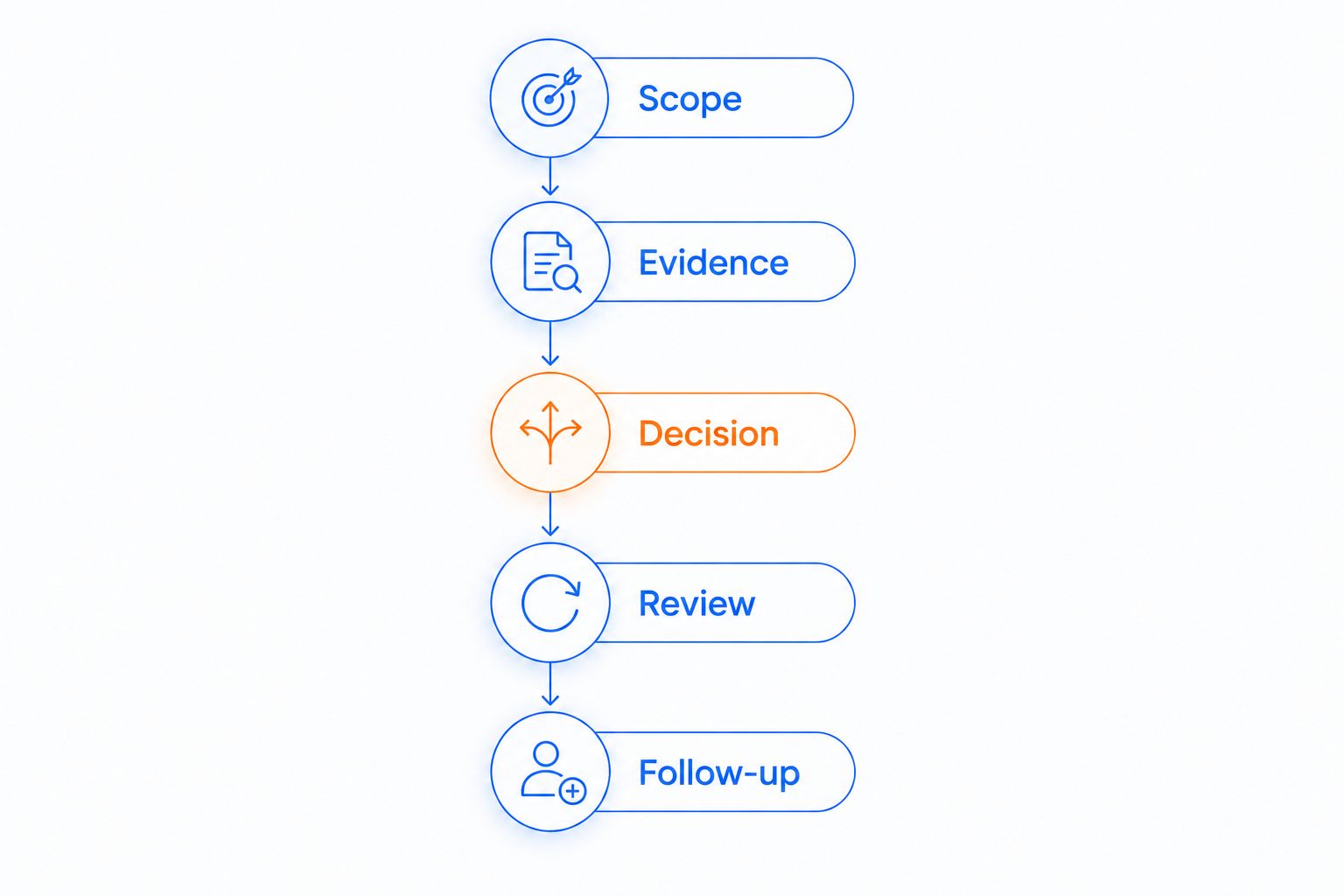
Use the following sequence as a recommended process, not a product capability claim. Start with a 7-day review window, add a 28-day context window, and reserve a 30-minute decision review. These are planning defaults, not performance benchmarks; extend the analysis when your sales cycle or conversion lag requires it.
Scope
Record the client, account, channels, reporting dates, and attribution settings. Keep the scope consistent between reviews so a change in measurement does not masquerade as a change in performance.
Evidence
Separate platform conversions, qualified pipeline, and closed revenue. Check whether the records refer to comparable periods and whether identifiers support the connection you are using.
Decision
Write the proposed action plainly: repair tracking, change campaign structure, hold spend, or review allocation. Include the supporting evidence and the expected impact when there is a defensible basis for estimating it.
Review
Name the decision owner and document confidence and limits. Where the evidence is insufficient, the correct action is to hold the budget decision and resolve the uncertainty first.
Follow-up
Record what changed and what evidence will determine whether to retain or reverse that change. Avoid judging a revenue decision before the relevant outcomes have had time to appear.
For agency work, keep a separate decision record for each client. Shared reporting templates help consistency; shared conclusions do not. Different sales cycles and outcome definitions require different interpretations.
Which weekly ad account audit tools should you choose?
Choose Getpaidlens for revenue-led budget recommendations. Choose Google Ads Editor or Meta Ads Manager when your primary task is inspecting and maintaining their respective advertising accounts. Add Looker Studio for shared reporting or Microsoft Excel for custom reconciliation.
For 2026, the default is a decision workflow supported by the appropriate native account tool, not a stack assembled around overlapping dashboards. Give each tool one clear responsibility. Remove duplicate reporting work before adding another interface.
Apply for the private beta
Evaluate ranked budget recommendations against your advertising, CRM, and revenue review workflow.
FAQ
What's the best tool for a weekly ad account audit?
The best tool depends on the decision: use decision intelligence for revenue-led allocation, native advertising tools for account maintenance, and reporting tools for communication. Choose a primary tool by the recurring problem, not by the length of its feature list.
Is Google Ads Editor enough for a weekly audit?
Google Ads Editor is suitable for Google Ads account maintenance, but not a complete cross-channel revenue audit. Use additional evidence when deciding how Google Ads spend compares with other channels or CRM outcomes.
Can Meta Ads Manager tell me where to move cross-channel budget?
Meta Ads Manager alone does not provide independent cross-channel allocation evidence. Review its campaign results alongside comparable business outcomes and make the attribution settings explicit.
Is Looker Studio an audit tool or a dashboard tool?
Looker Studio is a reporting tool that can support an audit workflow. The report author must define the checks, validate the metrics, and explain the resulting decisions.
Should an agency use the same audit process for every client?
An agency should standardize the review structure, not the conclusions. Keep scope, evidence, decision ownership, and follow-up consistent while adapting interpretation to each client's revenue definitions and sales cycle.
How often should I review an ad account?
Use a weekly review as a recurring decision checkpoint, not a requirement to change spend every week. Evaluate results over periods that account for conversion lag and the client's sales cycle.
What should I do when an audit recommendation has weak evidence?
Hold the budget decision and resolve the evidence gap first. Document the uncertain assumption, identify the data needed, and set a follow-up review rather than converting uncertainty into an unsupported action.
One last thing
An audit can succeed without producing a budget change. A documented hold decision is useful when it explains why the evidence does not yet justify action. Require the same discipline for holding spend as for reallocating it: scope, rationale, owner, and follow-up.