

Best overall for shared naming rules: UTM.io. Best for individual campaign links: Google Campaign URL Builder. Best for reusable campaign presets: Terminus. Best for custom naming logic: Google Sheets. These are the UTM tracking tools to consider in 2026 when your agency needs consistent campaign labels before connecting ad spend to pipeline and revenue.
- UTM.io is the default among UTM tracking tools for teams that need shared campaign naming conventions.
- Google Campaign URL Builder suits individual links; Google Sheets suits custom campaign naming logic.
- Terminus suits teams that want reusable UTM presets and a centralized link record.
- Getpaidlens addresses downstream budget decisions, not the campaign naming workflow evaluated here.
Why this matters
A campaign naming tool solves an upstream problem: making campaign identifiers consistent before traffic reaches analytics. It does not establish which campaign caused a sale. Keep those jobs separate.
For an agency, inconsistent labels also make client reporting harder to defend. A campaign entered under different names becomes different reporting rows, even when the team intended to describe the same initiative. Your naming policy must cover both the URL parameters and the names people enter in advertising platforms.
Getpaidlens connects advertising, CRM, analytics and revenue data to provide ranked, evidence-backed budget reallocation recommendations. That is a downstream decision layer, not a substitute for controlled campaign tagging.
Getpaidlens is best suited to performance marketers and agencies seeking evidence-backed budget recommendations from advertising and CRM data. Choose the naming workflow first. Then decide how you will evaluate the revenue attached to those names.
What makes the best UTM tracking tools
For a 2026 shortlist, assess the workflow rather than the length of the feature list. These criteria determine whether a tool fits an individual marketer, an agency or a marketing operations team:
- Naming control: Can your team use approved source, medium and campaign values without recreating the policy for every link?
- Repeatability: Can you reuse a campaign structure without copying an old URL and accidentally retaining the wrong values?
- Shared ownership: Can collaborators find the campaign record and understand who owns its naming decisions?
- Traceability: Can you connect the tagged URL to the campaign definition used in reporting and the CRM?
- Validation: Can your workflow catch malformed destinations, missing fields and inconsistent spelling before publication?
- Operational fit: Does the tool remove a real coordination problem, or introduce another system for a simple task?
Use 3 core fields for the basic campaign identity: utm_source, utm_medium and utm_campaign. Add 2 optional fields, utm_term and utm_content, when you need keyword or creative distinctions. Those 5 standard fields are enough to define the basic taxonomy discussed here; they are not a requirement to fill every field on every link.
UTM tracking tools at a glance
The table ranks tools by their fit for campaign creation and naming. It does not rank attribution accuracy or claim measured revenue improvements.
| Tool | Best for | Standout capability | Key limitation |
|---|---|---|---|
| UTM.io | Shared naming governance | Shared templates and campaign-link management | Requires an agreed taxonomy; the tool cannot resolve ambiguous definitions |
| Google Campaign URL Builder | Individual campaign links | Direct entry of UTM parameters into a destination URL | Does not provide a team approval or naming-governance workflow |
| Terminus | Reusable campaign presets | UTM presets and centralized link management | Presets need maintenance when campaign definitions change |
| Google Sheets | Custom naming logic | Formulas, validation rules and editable campaign records | Enforcement depends on how you configure and maintain the sheet |
Choose UTM.io by default when several people create campaign links. Choose Google Campaign URL Builder when the task is simply to produce a tagged URL. Use Terminus for a preset-led workflow, or Google Sheets when custom rules matter more than a dedicated interface.
1. UTM.io: best UTM tracking tool for shared naming rules
UTM.io combines UTM link creation with shared templates and campaign-link management. Its value is the shared process around link creation, rather than the ability to append parameters alone. That makes it a relevant first choice when multiple people tag links for the same client.
For an agency, the important question is whether each client has a clear vocabulary. A shared template is only useful when the team agrees on what source, medium and campaign mean. Establish those definitions before migrating existing links.
UTM.io pros:
- Shared templates support repeatable parameter structures.
- A dedicated link-management workflow separates campaign records from scattered documents.
- Team-oriented naming conventions address coordination beyond a single URL.
UTM.io cons:
- Shared rules still require an owner who resolves naming exceptions.
- Consistent UTMs do not prove incremental revenue or establish CRM attribution.
Best for: Agencies and marketing teams whose main problem is inconsistent campaign naming across contributors.
Ask the team to reproduce an existing campaign structure and an exception during evaluation. The useful test is whether both remain understandable to someone who did not create them.
Verdict: Buy for shared naming governance; skip it when you only need an occasional tagged link.
2. Google Campaign URL Builder: best for individual campaign links
Google Campaign URL Builder creates a tagged URL from a destination and the campaign parameters you enter. It is a direct tool for a direct job. You still decide what every value means and where the completed link is recorded.
This is the best starting point when a marketer already knows the naming convention and needs to build a link. It is not a campaign registry, approval system or replacement for analytics validation.
Google Campaign URL Builder pros:
- Keeps the destination and UTM inputs visible during link creation.
- Uses the standard campaign parameters needed for basic tagging.
- Avoids building a spreadsheet formula for a one-off URL.
Google Campaign URL Builder cons:
- Does not enforce an agency-wide naming policy.
- Requires a separate process for ownership, approvals and campaign records.
Best for: Individual marketers creating specific campaign links under an established naming policy.
Before publishing, open the generated destination and inspect the complete URL. Then test whether the receiving analytics setup captures the campaign as intended. A correctly assembled URL is not proof that the reporting configuration is correct.
Verdict: Buy into this workflow for individual links; skip it as your team governance system.
3. Terminus: best for reusable campaign presets
Terminus provides UTM URL building, presets and link management. Its strongest fit in this shortlist is a workflow that repeatedly uses established campaign structures. Presets reduce the need to reconstruct the same parameter choices each time.
Treat a preset as a controlled definition, not a convenient shortcut. If a campaign structure changes, the preset needs to change with it. Otherwise, the tool repeats an outdated convention consistently.
Terminus pros:
- Reusable presets support repeated campaign structures.
- Centralized link management provides a place to retain campaign URLs.
- A dedicated builder keeps routine URL creation out of custom spreadsheet formulas.
Terminus cons:
- Presets cannot determine whether a campaign definition is analytically useful.
- Stored links still need reconciliation with advertising and CRM campaign records.
Best for: Teams that organize link creation around reusable presets and a central campaign-link record.
Evaluate Terminus against the actual structures your team repeats. Include a renamed campaign and a creative variant. The relevant question is whether the resulting records remain clear, not whether the builder produces a URL.
Verdict: Buy for a preset-led campaign workflow; skip it if custom branching rules are your main requirement.
4. Google Sheets: best for custom campaign naming logic
Google Sheets lets you build a campaign register using formulas, dropdowns, data validation and protected ranges. You define the structure yourself. That flexibility suits teams with naming logic that needs to be visible and editable alongside the campaign brief.
The trade-off is ownership. A sheet only enforces the controls you configure, and a broken formula becomes a process problem. Keep generated URLs separate from editable inputs so users can see which cells they should change.
Google Sheets pros:
- Formulas support naming structures tailored to your organization.
- Dropdowns and validation rules constrain agreed inputs.
- Campaign context, ownership and generated URLs can sit in the same record.
Google Sheets cons:
- Formula maintenance becomes an internal responsibility.
- An editable sheet does not automatically provide a formal approval workflow.
Best for: Marketing operations teams that need custom naming logic and have a clear owner for the sheet.
Write a short instruction beside each input column. Explain what belongs there, not just its technical name. A campaign register that requires its author to interpret every row is not ready for agency-wide use.
Verdict: Buy into a spreadsheet workflow for custom logic; skip it without a maintenance owner.
How the tools were ranked
This 2026 ranking prioritizes naming control, repeatability and operational fit. It compares documented tool functions with the jobs described above; it does not claim hands-on performance testing, customer results or measured time savings.
UTM.io takes the default slot because shared conventions address the main coordination problem for multi-person teams. Google Campaign URL Builder wins the narrower individual-link task. Terminus earns the preset-led slot, while Google Sheets earns the custom-logic slot.
Getpaidlens is not ranked as a UTM builder. Its stated role is connecting marketing and revenue data to budget recommendations. Keeping that distinction explicit prevents you from buying a decision platform to solve a naming problem, or a naming tool to solve a budget problem.
Build a campaign naming workflow you can defend
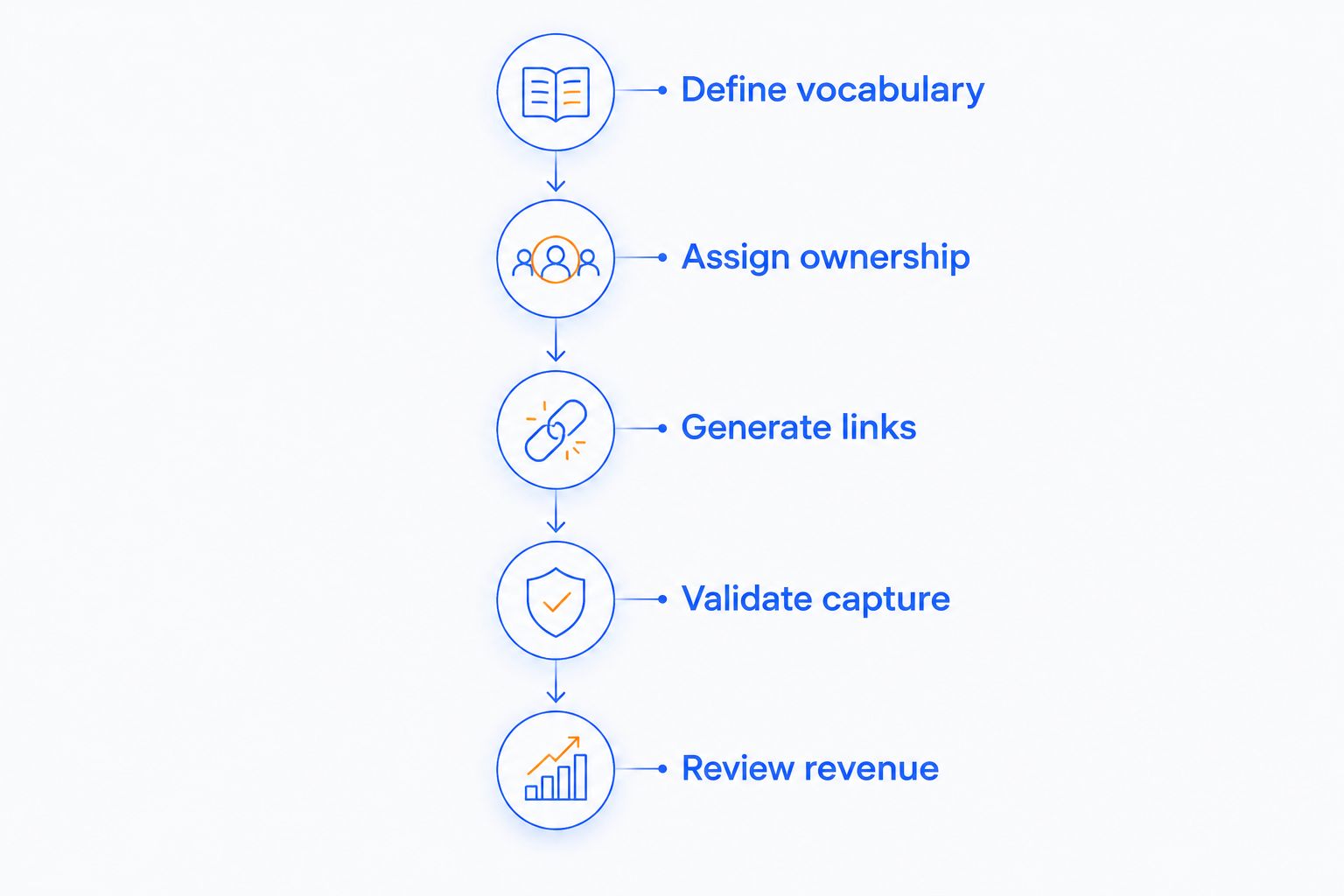
Use this sequence to turn your 2026 tool choice into a reporting process. Each stage should produce a record another person can inspect.
Define vocabulary
Specify allowed source and medium values. Define which parts belong in the campaign name and which belong in separate fields. Keep ad-platform campaign names and UTM campaign values aligned through a documented mapping; do not assume they must always be identical.
Assign ownership
Name the person responsible for each client's taxonomy. Give exceptions a review path. A tool does not settle disagreements about whether a label represents an audience, a product or an initiative.
Generate links
Create URLs through the chosen builder or controlled sheet. Retain the destination, parameters, campaign owner and campaign definition together. Avoid treating a URL pasted into a chat message as the permanent record.
Validate capture
Inspect the destination and parameter values before launch. Then verify the campaign dimensions in the receiving analytics system. Test the CRM capture separately if your reporting depends on source data reaching lead or opportunity records.
Review revenue
Use the campaign mapping to examine pipeline and revenue, not just visits. Read the guide to tools that tie ad spend to pipeline revenue when selecting this downstream layer. Distinguish observed associations from evidence that a budget change will produce additional revenue.
Which UTM tracking tool should you choose?
Choose UTM.io if several contributors need to follow the same naming rules. That is the default recommendation for an agency evaluating UTM tracking tools in 2026. Choose a narrower option only when your workflow has a narrower requirement.
Google Campaign URL Builder suits individual links. Terminus suits reusable presets. Google Sheets suits custom logic with a maintenance owner. None of these choices removes the need to validate analytics capture or document how campaign identifiers reach the CRM.
Once campaign data is consistent, evaluate Getpaidlens for evidence-backed budget recommendations. Its private beta is the next step for qualified agencies and marketing leaders evaluating that downstream decision workflow.
Apply for the private beta
Evaluate evidence-backed budget recommendations using advertising, CRM, analytics and revenue data.
FAQ
What's the best UTM tracking tool for an agency?
UTM.io is the default recommendation here for agencies that need shared campaign naming conventions. Its templates and link-management workflow address coordination, while the agency still owns the taxonomy and reporting validation.
Is Google Campaign URL Builder enough for campaign tracking?
Google Campaign URL Builder is enough to create an individual tagged URL. It does not replace a campaign registry, team naming policy or the analytics system that records campaign activity.
Is Terminus better than a spreadsheet for UTM naming?
Terminus is the better fit when reusable presets and dedicated link management are your main requirements. Google Sheets is the better fit when you need custom naming formulas and have someone responsible for maintaining them.
Which UTM parameters should I use?
Use utm_source, utm_medium and utm_campaign for the core campaign identity. Add utm_term and utm_content when keyword or creative distinctions are needed, and document how your team interprets each field.
Can UTM tags prove which campaign caused revenue?
No. UTM tags identify campaign values associated with recorded traffic; they do not establish causality. Revenue analysis also depends on tracking configuration, CRM capture and the attribution method you use.
Should I put customer information in UTM parameters?
No. Keep personal information out of UTM parameters because URLs can be stored, shared and logged. Use campaign-level identifiers rather than names, email addresses or other personal details.
Do campaign names in ad platforms have to match UTM names?
No, but you need a documented mapping when they differ. Without that mapping, reporting teams cannot reliably connect platform campaigns to the campaign identifiers recorded in analytics and the CRM.
One last thing
Never change historical campaign labels without preserving their mapping. A cleaner name does not make an old record the same as a new one. Keep the previous value, its replacement and the reason for the change so your next revenue review remains explainable.