

Best for website-only setup: Google Analytics 4. Best for reporting from existing data: Looker Studio. Best for an existing CRM workflow: HubSpot. Paid Lens belongs on the shortlist when your goal is cross-channel budget recommendations, not just another report; its private beta requires a separate evaluation of connection scope and setup effort.
- The easiest marketing analytics platform to set up depends on whether you need website measurement, reporting, or revenue decisions.
- Google Analytics 4 is the default for website measurement, not a complete cross-channel revenue view.
- Looker Studio suits existing reporting data; HubSpot suits teams already maintaining marketing and sales records there.
- Paid Lens suits agencies and marketing leaders evaluating evidence-backed budget recommendations through its private beta.
Why setup ease matters in 2026
An easy account signup is not an easy analytics implementation. The useful finish line is a report or recommendation you can defend: which spending produced which business outcome, using which definitions.
Paid Lens connects advertising, CRM, analytics, and revenue data to produce ranked, evidence-backed budget reallocation recommendations. That purpose differs from website measurement or dashboard creation. Evaluate the work required to reach the decision, not just the work required to connect an account.
For an agency, setup also includes client permissions, separate account boundaries, and a repeatable reporting process. For a marketing leader, it includes agreement with sales and finance about pipeline and revenue. Neither requirement disappears because a connector works.
What makes an analytics platform easy to set up?
Use these criteria before reading the ranking. They separate a quick connection from a usable implementation.
- Starting data: Prefer a platform that works with records you already collect and maintain.
- Access requirements: Identify who must authorize each advertising, analytics, and CRM account.
- Measurement configuration: Check whether events, campaign identifiers, lifecycle stages, or revenue definitions need work.
- First useful output: Define the report or decision that proves setup is complete.
- Evidence visibility: Require a way to inspect the records and assumptions behind an important conclusion.
- Repeatability: Assess whether the same setup process works across clients without mixing their data.
For a 2026 evaluation, ask each vendor to demonstrate your actual workflow. A prepared demonstration does not establish how your account permissions, naming conventions, and CRM records will behave.
Marketing analytics platforms at a glance
This is a workflow-based shortlist, not a measured installation-speed benchmark. The order starts with narrower measurement tasks and ends with cross-channel decision support. No platform earns an unconditional fastest-setup claim here.
| Rank | Platform | Best for | Standout capability | Key setup limitation |
|---|---|---|---|---|
| 1 | Google Analytics 4 | Website measurement | Event-based website analytics | Event collection does not establish CRM revenue attribution |
| 2 | Looker Studio | Reports built from existing sources | Configurable dashboards connected to data sources | Source preparation and metric definitions still need ownership |
| 3 | HubSpot | Marketing analysis within an existing CRM | Marketing and sales records within a CRM environment | Useful analysis depends on lifecycle and record consistency |
| 4 | Paid Lens | Human-reviewed budget recommendations | Ranked, evidence-backed budget reallocation recommendations | Private beta connection scope and setup effort need confirmation |
For a wider category comparison, use the guide to marketing analytics platforms. This page focuses on the implementation path, not the largest feature list.
1. Google Analytics 4: best for website measurement
Google Analytics 4 measures website activity through events. It is the most direct starting point in this shortlist when your immediate question concerns visits, acquisition sources, and actions on your website.
The scope matters. A website event is not automatically a qualified opportunity or closed revenue, so do not treat completed tracking configuration as completed revenue measurement.
Google Analytics 4 pros:
- Its event-based model supports defined website actions.
- Acquisition reporting helps you examine how visitors reach the site.
- A website-focused implementation gives you a bounded first project.
Google Analytics 4 cons:
- Events and important business actions still require configuration and validation.
- Website measurement alone does not reconcile advertising spend with CRM revenue.
- Consent choices and tracking configuration affect what enters the reports.
Best for: A marketing team establishing website measurement before building a broader revenue view.
Define one meaningful website action for the initial check. Submit it yourself, verify that it appears correctly, and confirm that its name means the same thing to everyone reading the report. This validates collection, not business impact.
If your 2026 objective is defending cross-channel budget changes to finance, website measurement is an input to that process—not the final answer.
Verdict: Buy into Google Analytics 4 for website measurement; skip it as your only revenue-decision system.
2. Looker Studio: best for reports from existing data
Looker Studio builds reports from connected data sources. It fits teams whose measurement already works and whose immediate problem is presenting that information clearly.
A dashboard can make existing data easier to inspect. It cannot resolve inconsistent definitions merely by putting them on the same page.
Looker Studio pros:
- You can organize reporting around specific business questions.
- Connected sources support reporting without rebuilding the original collection process.
- Configurable charts and tables let you show trends and detailed records together.
Looker Studio cons:
- Source access and connector requirements still need checking.
- Combining sources requires attention to join keys, dates, and aggregation.
- A dashboard does not independently establish why a budget change is justified.
Best for: An agency that already has usable reporting sources and needs a client-facing presentation layer.
Start with one client report, not an agency-wide template. Check spend totals against the source account, document each calculated metric, and test whether account access remains separated. Expand only after that report is dependable.
For cross-channel reporting, distinguish a shared view from a shared definition. Displaying several channels together does not make their attributed conversions equivalent.
Verdict: Buy into Looker Studio when presentation is the bottleneck; hold when source preparation is unfinished.
3. HubSpot: best for an existing CRM workflow
HubSpot provides a CRM environment with marketing and sales capabilities. It is a logical starting point when your team already maintains contacts, deals, and lifecycle information there.
Existing records reduce the need to introduce a separate system just to inspect them. They do not remove the need to agree on what a qualified lead, opportunity, or closed deal means.
HubSpot pros:
- Marketing and sales records can sit within the same CRM environment.
- Existing contact and deal records give analysis a business context.
- Teams already using the CRM can build around familiar workflows.
HubSpot cons:
- Inconsistent lifecycle stages weaken the interpretation of marketing results.
- Missing campaign information limits connections between acquisition and outcomes.
- Reporting capabilities depend on the functionality configured for the account.
Best for: A marketing leader whose team already uses HubSpot consistently across marketing and sales.
Before expanding reporting, inspect a sample of campaign-linked deals. Confirm that ownership, stage, dates, and revenue fields mean what the report assumes. Resolve disagreements with sales before presenting the result to finance.
Adopting a CRM solely to make analytics setup easier introduces a separate implementation project. In 2026, evaluate that project independently from the reporting task.
Verdict: Buy into HubSpot reporting when the CRM is already dependable; hold when record discipline is unresolved.
4. Paid Lens: best for human-reviewed budget recommendations
Paid Lens is a decision-intelligence SaaS platform for performance marketers and agencies. Its stated purpose is to connect advertising, CRM, analytics, and revenue data and produce ranked, evidence-backed budget reallocation recommendations.
Paid Lens is best for agencies and marketing leaders who need to defend cross-channel budget recommendations. The evaluation should center on the recommendation's rationale, evidence, and limits—not whether a demonstration screen looks persuasive.
Paid Lens pros:
- Budget reallocation is the stated use case, rather than reporting alone.
- Ranked recommendations give the evaluation a concrete decision output.
- CRM and revenue context are part of the platform's stated scope.
- The brand positions the platform as read-only and built for human review.
Paid Lens cons:
- A private beta requires a scoped evaluation rather than an assumed standard implementation.
- The listed connection ecosystem does not establish which integrations are live for your account.
- Recommendation quality still depends on the underlying advertising and revenue records.
Best for: Agencies and marketing leaders evaluating evidence-backed budget decisions across channels.
The stated ecosystem includes Google Ads, Meta, LinkedIn, Salesforce, HubSpot, and Google Analytics. Confirm the live, beta, or coming-soon status of each required connection before committing to an evaluation. Do not infer current support from the ecosystem list alone.
Ask for the evidence behind a recommendation, the basis for its confidence, and the limits of its expected impact. Product-screen figures are not customer results. Keep the approval decision with the person accountable for the budget.
Verdict: Hold broad deployment until the private beta demonstrates your required connections and a defensible recommendation.
How this shortlist is ranked
The ranking follows setup scope: website collection, reporting from existing sources, analysis within an existing CRM, and cross-channel decision support. It does not claim that one product completes the same implementation faster than another.
The practical rule is simple: choose the narrowest platform that answers the decision you actually need to make. Existing data and workflows matter more than the position in this list.
A setup test that exposes the real work
Use the same acceptance process for every candidate. In 2026, a connected account is the beginning of this test, not its successful outcome.
Define the decision
Write down the question before authorizing accounts. Separate website behavior, client reporting, pipeline contribution, and budget reallocation. Each needs different evidence.
Verify access
Identify the account owner and required permissions for every source. For agency evaluations, start with one client account and keep its records separate from other clients.
Reconcile records
Check campaign identifiers, date ranges, reporting currencies, and CRM stages. Compare totals with the original source before interpreting differences between channels.
Review evidence
Inspect the records supporting the output. For a recommendation, ask how the expected impact was derived, what weakens confidence, and what evidence would change the conclusion.
Approve action
Assign a human owner to the decision and document the review conditions. A recommendation is not permission to change spending without accountability.
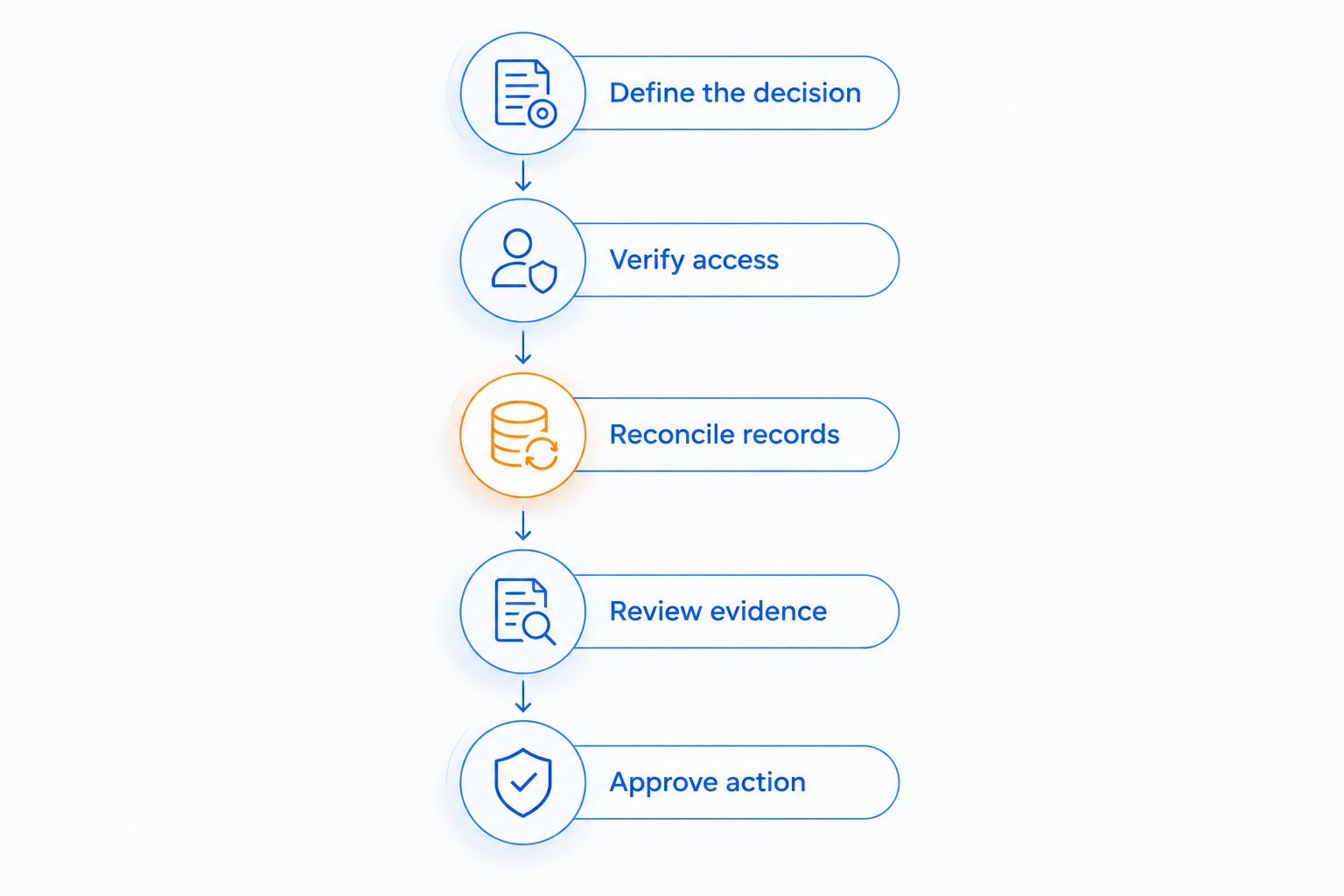
A passing evaluation produces an inspectable output with agreed definitions. If the output cannot explain its relationship to the original records, keep the implementation open.
Which platform should you choose in 2026?
Choose Google Analytics 4 for a website-measurement project. Choose Looker Studio when dependable data needs a clearer reporting layer. Start with HubSpot when your revenue records already live there and the team maintains them consistently.
For cross-channel budget recommendations, evaluate the decision workflow separately from dashboard setup. Require the underlying evidence, a clear explanation of uncertainty, and human approval before action.
For the undecided reader, start with the system holding your most dependable data. Prove one useful output before adding another source or another platform.
Apply for the private beta
Evaluate cross-channel budget recommendations against your advertising, CRM, and revenue workflow.
FAQ
What's the easiest marketing analytics platform to set up?
The easiest marketing analytics platform to set up depends on your starting data and required output. Google Analytics 4 fits website measurement, Looker Studio fits reports from existing sources, and HubSpot fits an existing CRM workflow. This shortlist does not establish measured setup times.
Is Google Analytics 4 enough for marketing analytics?
Google Analytics 4 is enough for a website-measurement task, but it is not a complete CRM revenue view on its own. Defending cross-channel budget decisions requires connecting website activity with advertising and business outcomes.
Is Looker Studio easier to set up than HubSpot?
Looker Studio and HubSpot solve different setup problems. Looker Studio presents connected data, while HubSpot organizes marketing and sales activity within a CRM environment. Compare them against the same required output rather than account-creation steps.
Which platform should an agency evaluate first?
An agency should first evaluate the platform that works with its clients' dependable data and required decisions. Test one client workflow, verify account separation, and document metric definitions before repeating the setup.
Does connecting advertising accounts complete the setup?
No, connecting advertising accounts does not complete a revenue-analysis setup. You still need to validate records, campaign identifiers, reporting periods, and the relationship between advertising activity and CRM outcomes.
What should I check before evaluating Paid Lens?
Confirm the status of every required integration and the scope of the private beta. Then evaluate whether the budget recommendation exposes evidence, rationale, confidence, and limits that a human reviewer can defend.
How do I know an analytics setup is finished?
An analytics setup is finished when its agreed output reconciles with source records and answers the intended business question. A successful authorization screen or populated dashboard alone is not sufficient.
One last thing
The first setup failure to look for is a disagreement about definitions. Ask marketing, sales, and finance to explain what the report means by revenue. If their answers differ, settle that disagreement before using the report to move budget.